1. Introduction to Thermoforming
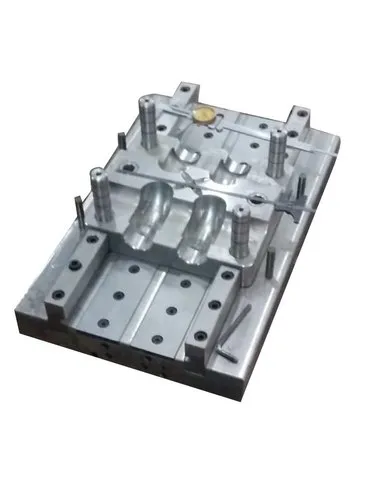
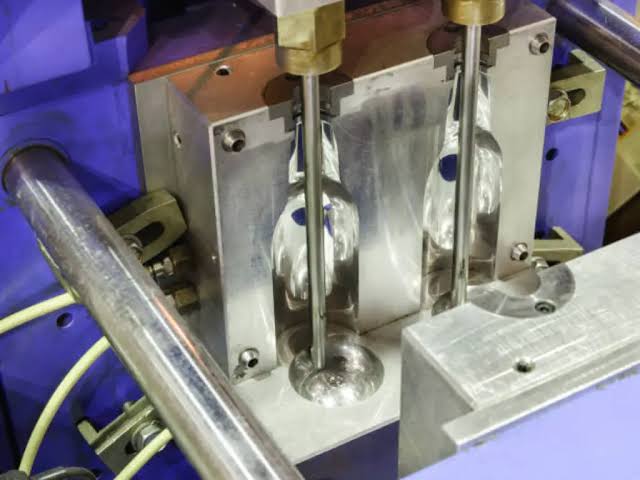
Thermoforming is a manufacturing process used to produce plastic products by heating a thermoplastic sheet until it becomes soft and flexible, then forming it into a desired shape using a mould.
During the process, the heated plastic sheet is stretched over or into a mould using vacuum pressure, compressed air, mechanical force, or a combination of these methods. After forming, the plastic is cooled, solidified, and trimmed to obtain the finished product.
Thermoforming is widely used in industries such as packaging, automotive, medical equipment, electronics, household products, and food containers.
Common thermoformed products include:
- Food packaging trays.
- Disposable cups.
- Plastic containers.
- Refrigerator liners.
- Automotive interior panels.
- Protective packaging.
- Medical trays.
- Plastic covers and housings.
Although thermoforming is a relatively efficient manufacturing process, several problems can occur during production due to incorrect heating, improper material selection, unsuitable mould design, incorrect vacuum pressure, cooling variations, and machine-setting errors.
Troubleshooting thermoforming problems refers to the systematic process of identifying, analysing, and correcting defects that occur during the thermoforming process.
The main objective of troubleshooting is to identify the root cause of production problems, improve product quality, reduce material waste, minimise machine downtime, and maintain consistent manufacturing performance.
2. What Is Troubleshooting in Thermoforming?
Troubleshooting is a problem-solving process used to identify and eliminate the causes of defects or abnormal conditions during manufacturing.
In thermoforming, troubleshooting involves examining the machine, heating system, plastic sheet, mould, vacuum system, cooling arrangement, and operating parameters to determine why a defect has occurred.
For example, if a thermoformed plastic container has thin walls, the technician must identify whether the problem is caused by excessive sheet stretching, incorrect heating, poor mould design, or unsuitable forming conditions.
Troubleshooting should not involve randomly changing machine settings. Instead, it should follow a systematic approach based on observation, measurement, testing, and root-cause analysis.
Main Objectives of Troubleshooting
- Identify the causes of thermoforming defects.
- Improve product quality.
- Maintain uniform wall thickness.
- Reduce material wastage.
- Improve dimensional accuracy.
- Maintain consistent heating conditions.
- Improve mould performance.
- Reduce production downtime.
- Increase manufacturing efficiency.
- Improve the overall reliability of the thermoforming process.
3. Basic Working Process of Thermoforming
Understanding the thermoforming process is essential for identifying and correcting production problems.
The process generally involves the following stages.
Step 1: Plastic Sheet Feeding
A thermoplastic sheet is supplied to the thermoforming machine.
Common materials include:
- ABS (Acrylonitrile Butadiene Styrene).
- PET (Polyethylene Terephthalate).
- HIPS (High Impact Polystyrene).
- PVC (Polyvinyl Chloride).
- PP (Polypropylene).
- PS (Polystyrene).
- PC (Polycarbonate).
The sheet must have suitable thickness, material properties, and surface quality.
Step 2: Heating
The plastic sheet is heated using suitable heating elements until it reaches the required forming temperature.
The material becomes soft and flexible enough to be shaped.
Uniform heating is important because uneven temperature distribution can cause defects such as wrinkles, webbing, and uneven wall thickness.
Step 3: Forming
The heated sheet is moved towards the mould and formed into the required shape.
Depending on the thermoforming technique, forming may use:
- Vacuum pressure.
- Compressed air.
- Mechanical plugs.
- A combination of vacuum and pressure.
Step 4: Cooling
After forming, the plastic material is cooled inside or against the mould.
Cooling allows the plastic to solidify and retain the required shape.
Step 5: Demoulding
Once the product has cooled sufficiently, it is removed from the mould.
The finished component should maintain its intended dimensions and shape.
Step 6: Trimming
Excess plastic material is removed using cutting tools, trimming presses, or automated cutting systems.
Step 7: Quality Inspection
The finished product is inspected for defects such as:
- Cracks.
- Wrinkles.
- Thin walls.
- Poor surface finish.
- Dimensional variation.
- Incomplete forming.
- Uneven trimming.
4. Common Thermoforming Problems and Their Causes
Several defects can occur during thermoforming. Each defect has different possible causes and requires an appropriate corrective action.
1. Uneven Wall Thickness
Uneven wall thickness is one of the most common problems in thermoforming.
It occurs when the plastic sheet stretches unevenly during the forming process.
Possible causes:
- Uneven sheet heating.
- Incorrect forming temperature.
- Improper plug-assist operation.
- Poor mould design.
- Excessive material stretching.
- Incorrect vacuum timing.
- Uneven material distribution.
Effects:
- Weak product sections.
- Reduced mechanical strength.
- Poor product appearance.
- Inconsistent product dimensions.
- Increased rejection rates.
Troubleshooting and solutions:
- Check the temperature distribution across the heating zones.
- Adjust the heating time and temperature.
- Inspect plug-assist position and movement.
- Review mould geometry.
- Check vacuum timing and forming conditions.
- Evaluate the starting sheet thickness.
- Conduct wall-thickness measurements at different product locations.
2. Webbing
Webbing refers to unwanted folds or stretched plastic material that forms between different sections of a thermoformed product or between adjacent cavities.
It commonly occurs when the heated sheet stretches excessively or material gathers in certain areas.
Possible causes:
- Excessive sheet heating.
- Incorrect mould spacing.
- Poor mould design.
- Improper sheet positioning.
- Excessive material sagging.
- Incorrect plug-assist settings.
Effects:
- Poor product appearance.
- Incomplete mould definition.
- Material wastage.
- Difficulty during trimming.
Troubleshooting and solutions:
- Check the heating temperature.
- Reduce excessive heating where appropriate.
- Inspect mould spacing and geometry.
- Adjust plug-assist movement.
- Check sheet positioning.
- Review the forming sequence.
- Optimise material distribution.
3. Wrinkles
Wrinkles are unwanted folds that develop on the surface of the thermoformed product.
They generally occur when the plastic sheet is not stretched or distributed evenly during forming.
Possible causes:
- Improper sheet heating.
- Excessive material sagging.
- Incorrect mould design.
- Poor sheet clamping.
- Uneven material stretching.
- Incorrect forming pressure.
Effects:
- Poor surface appearance.
- Reduced dimensional accuracy.
- Weak product sections.
- Difficulties during trimming.
Troubleshooting and solutions:
- Ensure uniform heating.
- Check sheet clamping conditions.
- Adjust forming pressure.
- Inspect mould geometry.
- Optimise plug-assist movement.
- Check sheet tension and positioning.
4. Thin Areas in the Product
Thin areas occur when certain sections of the heated plastic sheet stretch more than others.
This problem is particularly common in deep-drawn products and complex mould geometries.
Possible causes:
- Excessive heating.
- Incorrect plug-assist design.
- High stretching ratio.
- Poor material distribution.
- Improper mould depth.
- Incorrect forming sequence.
Effects:
- Reduced product strength.
- Punctures or tearing.
- Product failure during use.
- Inconsistent quality.
Troubleshooting and solutions:
- Measure the wall thickness at different locations.
- Check the sheet heating profile.
- Adjust plug-assist design and temperature.
- Review the mould depth and geometry.
- Select a suitable sheet thickness.
- Optimise vacuum and pressure settings.
5. Incomplete Forming
Incomplete forming occurs when the heated plastic sheet does not fully reproduce the required mould shape.
This may result in missing details, rounded corners, or improperly formed sections.
Possible causes:
- Insufficient vacuum pressure.
- Vacuum leakage.
- Low forming temperature.
- Blocked vacuum holes.
- Incorrect mould venting.
- Insufficient forming time.
- Improper sheet positioning.
Effects:
- Poor product definition.
- Incorrect dimensions.
- Missing mould details.
- Product rejection.
Troubleshooting and solutions:
- Check the vacuum pump performance.
- Inspect vacuum pipes and connections for leakage.
- Clean blocked vacuum holes.
- Verify the sheet temperature.
- Check the mould venting system.
- Adjust forming time.
- Ensure proper sheet positioning.
6. Cracking and Tearing
Cracking and tearing occur when the plastic sheet becomes damaged during forming.
These defects may develop when the material is stretched beyond its allowable forming limits.
Possible causes:
- Insufficient heating.
- Excessive stretching.
- Sharp mould edges.
- Poor material quality.
- Incorrect sheet thickness.
- Excessive plug pressure.
- Improper mould design.
Effects:
- Product leakage.
- Structural weakness.
- Poor appearance.
- High rejection rates.
Troubleshooting and solutions:
- Check the material forming temperature.
- Inspect mould edges and corners.
- Reduce excessive stretching.
- Adjust plug-assist settings.
- Use suitable sheet thickness.
- Verify material quality.
- Review the mould design and forming ratio.
7. Blisters and Bubbles
Blisters and bubbles are raised or trapped-air defects that appear on the surface of the thermoformed product.
They may be caused by moisture, trapped gases, material contamination, or overheating.
Possible causes:
- Moisture in hygroscopic materials.
- Excessive heating.
- Contamination in the plastic sheet.
- Poor material storage.
- Trapped air.
- Degradation of the plastic.
Effects:
- Poor surface finish.
- Reduced product strength.
- Inconsistent appearance.
- Increased product rejection.
Troubleshooting and solutions:
- Check the material storage conditions.
- Dry moisture-sensitive materials according to supplier recommendations.
- Verify heating temperature.
- Avoid overheating.
- Inspect sheet quality.
- Ensure proper material handling.
- Check whether contamination is present.
8. Poor Surface Finish
Poor surface finish occurs when the thermoformed product has unwanted marks, rough areas, scratches, or uneven textures.
Possible causes:
- Dirty mould surfaces.
- Scratched mould cavities.
- Incorrect heating temperature.
- Material contamination.
- Improper mould release.
- Damaged plastic sheets.
Effects:
- Reduced product appearance.
- Poor customer satisfaction.
- Difficulty meeting quality standards.
Troubleshooting and solutions:
- Clean mould surfaces regularly.
- Polish or repair damaged mould areas.
- Check the plastic sheet quality.
- Maintain suitable forming temperatures.
- Use appropriate release agents where permitted.
- Prevent dust and contamination.
9. Excessive Sagging
Sagging occurs when the heated plastic sheet droops excessively before forming.
Some sagging is normal in thermoforming, but excessive sagging can cause material distribution problems.
Possible causes:
- Excessive heating time.
- High sheet temperature.
- Uneven heating.
- Incorrect sheet thickness.
- Poor sheet support.
- Incorrect material selection.
Effects:
- Uneven wall thickness.
- Wrinkles.
- Webbing.
- Inconsistent product dimensions.
Troubleshooting and solutions:
- Reduce excessive heating time.
- Adjust heating zones.
- Check sheet thickness.
- Inspect sheet clamping and support.
- Optimise the forming cycle.
- Maintain suitable material temperature.
10. Product Warping and Distortion
Warping occurs when the finished product bends, twists, or changes shape after forming.
Possible causes:
- Uneven cooling.
- Insufficient cooling time.
- Uneven material thickness.
- Residual stresses.
- Incorrect mould temperature.
- Improper demoulding.
- Inconsistent material properties.
Effects:
- Dimensional inaccuracies.
- Poor fitting.
- Difficulty during assembly.
- Product rejection.
Troubleshooting and solutions:
- Ensure uniform cooling.
- Adjust cooling time.
- Check mould temperature distribution.
- Avoid premature demoulding.
- Review forming conditions.
- Inspect product dimensions after cooling.
11. Poor Trimming Quality
Trimming is the process of removing excess material from the formed product.
Poor trimming quality can result in rough, uneven, or damaged edges.
Possible causes:
- Blunt cutting tools.
- Incorrect trimming position.
- Improper fixture alignment.
- Incorrect cutting pressure.
- Inconsistent product dimensions.
- Poor trimming equipment maintenance.
Effects:
- Sharp edges.
- Uneven product dimensions.
- Poor appearance.
- Assembly difficulties.
Troubleshooting and solutions:
- Inspect cutting tools.
- Replace blunt blades.
- Check trimming fixture alignment.
- Verify cutting positions.
- Adjust cutting parameters.
- Inspect the finished edges.
5. Summary of Common Thermoforming Problems
The following table provides a quick reference for identifying common thermoforming defects and their possible causes.
| Problem | Main possible cause | Corrective action |
|---|---|---|
| Uneven wall thickness | Uneven heating | Adjust heating zones |
| Webbing | Excessive sagging | Optimise heating and mould layout |
| Wrinkles | Uneven material distribution | Adjust heating and forming conditions |
| Thin areas | Excessive stretching | Improve material distribution |
| Incomplete forming | Low vacuum or poor venting | Check vacuum and mould vents |
| Cracking | Excessive stretching or low temperature | Optimise forming conditions |
| Blisters | Moisture or overheating | Improve drying and temperature control |
| Poor surface finish | Dirty or damaged mould | Clean and polish the mould |
| Excessive sagging | Excessive heating | Adjust heating time |
| Warping | Uneven cooling | Improve cooling conditions |
| Poor trimming | Blunt cutting tools | Maintain trimming equipment |
6. Important Parameters Affecting Thermoforming Quality
Several process parameters influence the quality of thermoformed products.
A. Heating Temperature
Heating temperature determines how soft and flexible the plastic sheet becomes.
If the temperature is too low, the sheet may not stretch properly.
If the temperature is too high, the material may become excessively soft, sag, degrade, or develop surface defects.
Importance:
- Controls material flexibility.
- Influences stretching behaviour.
- Affects wall thickness.
- Influences product surface quality.
B. Heating Time
Heating time determines how long the plastic sheet remains exposed to the heating elements.
Incorrect heating time can cause underheating or overheating.
Importance:
- Ensures suitable material temperature.
- Helps maintain uniform forming conditions.
- Reduces defects caused by inconsistent heating.
C. Vacuum Pressure
Vacuum pressure removes air between the heated plastic sheet and the mould surface, allowing the material to take the required shape.
Insufficient vacuum can result in incomplete forming.
Importance:
- Improves mould detail reproduction.
- Helps achieve accurate product geometry.
- Reduces incomplete forming.
D. Forming Pressure
Forming pressure determines how effectively the heated plastic sheet is pushed against the mould.
Depending on the machine, this may involve vacuum pressure, compressed air, or both.
Importance:
- Supports complete mould filling.
- Improves product definition.
- Influences surface contact.
E. Cooling Time
Cooling time determines how long the product remains in the mould before removal.
Insufficient cooling can cause warping and dimensional instability.
Importance:
- Maintains product shape.
- Improves dimensional stability.
- Reduces deformation during demoulding.
F. Plug-Assist Settings
Plug assist is a mechanical device used in certain thermoforming processes to help distribute material before or during forming.
Importance:
- Helps control wall thickness.
- Reduces excessive stretching in selected areas.
- Improves material distribution.
- Supports forming of deep products.
G. Sheet Thickness
The thickness of the incoming plastic sheet affects the final wall thickness, product strength, and forming behaviour.
A suitable starting sheet thickness should be selected according to the product design and material requirements.
7. Troubleshooting Vacuum System Problems
The vacuum system plays an important role in vacuum thermoforming.
It removes air between the plastic sheet and the mould, allowing atmospheric pressure to push the heated sheet against the mould surface.
Common vacuum system problems include:
1. Low Vacuum Pressure
Possible causes:
- Vacuum pump malfunction.
- Leakage in pipes.
- Loose connections.
- Damaged seals.
- Blocked filters.
Solutions:
- Inspect the vacuum pump.
- Check pipe connections.
- Replace damaged seals.
- Clean filters.
- Test the system for leakage.
2. Slow Vacuum Formation
Possible causes:
- Restricted airflow.
- Incorrect valve operation.
- Blocked vacuum holes.
- Insufficient vacuum pump capacity.
Solutions:
- Clean the vacuum passages.
- Inspect control valves.
- Check pump performance.
- Inspect the vacuum reservoir and pipework.
3. Uneven Vacuum Distribution
Possible causes:
- Poor mould venting.
- Blocked vacuum channels.
- Incorrect vacuum-hole arrangement.
- Damaged mould connections.
Solutions:
- Clean mould vents.
- Inspect vacuum channels.
- Check the mould design.
- Verify vacuum distribution.
8. Troubleshooting Heating System Problems
The heating system is responsible for bringing the plastic sheet to the correct forming temperature.
Heating problems can significantly affect product quality.
Common Heating Problems
1. Uneven Heating
Possible causes:
- Faulty heating elements.
- Incorrect heater-zone settings.
- Uneven heater spacing.
- Temperature sensor problems.
Solutions:
- Inspect heating elements.
- Check individual heating zones.
- Verify sensor accuracy.
- Monitor temperature distribution.
2. Overheating
Possible causes:
- Excessive heating time.
- Incorrect temperature settings.
- Faulty temperature controllers.
- Defective sensors.
Solutions:
- Adjust heating time.
- Verify temperature settings.
- Inspect temperature controllers.
- Replace faulty sensors.
3. Insufficient Heating
Possible causes:
- Low heater output.
- Incorrect temperature settings.
- Short heating time.
- Excessive machine speed.
Solutions:
- Check heater performance.
- Increase heating time where appropriate.
- Verify temperature settings.
- Review the production cycle.
9. Troubleshooting Mould-Related Problems
The mould determines the final shape and dimensions of the thermoformed product.
Therefore, mould condition and design are extremely important.
Common mould-related problems include:
1. Blocked Vent Holes
Blocked vent holes prevent air from escaping during forming.
Solution: Clean the vent holes and inspect the vacuum passages.
2. Damaged Mould Surface
Scratches, dents, and corrosion can affect product appearance.
Solution: Repair, polish, or replace damaged mould components as appropriate.
3. Incorrect Mould Temperature
Incorrect mould temperature can affect cooling and product release.
Solution: Check the temperature-control system and maintain the recommended mould temperature.
4. Poor Draft Angle
Insufficient draft angle can make it difficult to remove the formed product.
Solution: Review mould design and introduce suitable draft angles where technically possible.
5. Poor Mould Alignment
Incorrect mould alignment can cause dimensional problems and uneven forming.
Solution: Inspect mould mounting, alignment, and positioning systems.
10. Step-by-Step Troubleshooting Procedure
A systematic troubleshooting procedure helps technicians identify the root cause of problems more effectively.
Step 1: Identify the Defect
Observe the finished product and identify the type of defect.
Examples:
- Thin wall.
- Wrinkle.
- Crack.
- Bubble.
- Incomplete forming.
- Warping.
Step 2: Record the Machine Parameters
Record the current production settings, including:
- Heating temperature.
- Heating time.
- Vacuum pressure.
- Forming pressure.
- Cooling time.
- Machine cycle time.
- Sheet thickness.
Step 3: Inspect the Raw Material
Check whether the plastic sheet meets the required specifications.
Inspect for:
- Thickness variation.
- Moisture.
- Contamination.
- Surface damage.
- Incorrect material grade.
Step 4: Inspect the Heating System
Verify the performance of heaters, temperature controllers, and sensors.
Check whether the sheet is heated uniformly.
Step 5: Inspect the Vacuum and Pressure Systems
Check for leakage, blocked passages, defective valves, and insufficient pressure.
Step 6: Inspect the Mould
Examine the mould surface, vent holes, alignment, and overall condition.
Step 7: Identify the Root Cause
Compare the observed defect with the process conditions and inspection results.
Use structured problem-solving methods rather than changing multiple parameters simultaneously.
Step 8: Apply Corrective Actions
Make controlled adjustments to the machine, material, or mould.
Step 9: Conduct Trial Production
Produce sample components after making adjustments.
Check whether the defect has been eliminated.
Step 10: Verify and Document the Results
Inspect the sample products and record the successful settings.
Continue production only after confirming that the product meets the required specifications.
11. Root Cause Analysis in Thermoforming
Root cause analysis is a systematic method used to identify the actual reason behind a production problem.
Instead of correcting only the visible defect, root cause analysis focuses on eliminating the underlying cause.
Common methods include:
A. 5 Whys Technique
The 5 Whys method involves repeatedly asking why a problem occurred until the underlying cause is identified.
Example: Problem – Plastic product has uneven wall thickness.
- Why 1: Why is the wall thickness uneven? Because the plastic sheet stretches unevenly.
- Why 2: Why does it stretch unevenly? Because the sheet temperature is not uniform.
- Why 3: Why is the temperature not uniform? Because one heating zone is producing less heat.
- Why 4: Why is the heating zone producing less heat? Because a heating element is damaged.
- Why 5: Why was the damaged element not detected? Because regular heater inspection was not performed.
Root cause: Inadequate maintenance and inspection of the heating system.
Corrective action: Replace the faulty heating element and introduce regular heating-system inspections.
B. Fishbone Diagram
A fishbone diagram is used to identify possible causes of a problem under different categories.
Common categories include:
- Man: Operator skill and training.
- Machine: Equipment condition and machine settings.
- Material: Sheet quality and material properties.
- Method: Manufacturing procedure and process parameters.
- Measurement: Inspection and measurement accuracy.
- Environment: Temperature, humidity, dust, and surrounding conditions.
This method helps teams investigate defects from multiple perspectives.
12. Preventive Maintenance in Thermoforming
Preventive maintenance involves regularly inspecting and maintaining thermoforming equipment to prevent unexpected failures.
Daily Maintenance
- Clean the mould surface.
- Check the heating elements.
- Inspect the vacuum system.
- Check sheet feeding and clamping.
- Inspect trimming tools.
- Remove plastic residue.
- Monitor machine operating conditions.
Weekly Maintenance
- Inspect vacuum pipes and connections.
- Check heater performance.
- Examine mould vent holes.
- Inspect moving components.
- Check cooling arrangements.
- Verify temperature sensors.
Monthly Maintenance
- Inspect the vacuum pump.
- Check electrical connections.
- Inspect the mould for wear.
- Verify temperature-control accuracy.
- Inspect hydraulic and pneumatic systems.
- Review recurring production defects.
Periodic Maintenance
- Calibrate measuring instruments.
- Inspect machine safety systems.
- Replace worn components.
- Service the vacuum pump.
- Inspect mould alignment.
- Perform detailed machine performance checks.
Maintenance frequency should be determined according to machine usage, manufacturer recommendations, and production conditions.
13. Quality Control Methods in Thermoforming
Quality control is necessary to ensure that thermoformed products meet the required specifications.
Common inspection methods include:
1. Visual Inspection
Checks the product for wrinkles, cracks, bubbles, scratches, and surface defects.
2. Thickness Measurement
Measures wall thickness at different locations to identify uneven material distribution.
3. Dimensional Inspection
Checks length, width, height, depth, and other critical product dimensions.
4. Weight Measurement
Measures product weight to identify material distribution or process variations.
5. Leak Testing
Used for products that require leak resistance, such as certain containers and trays.
6. Functional Testing
Checks whether the finished product performs its intended function.
7. Surface Finish Inspection
Evaluates surface quality, texture, and appearance.
8. Material Testing
Where required, evaluates material properties such as strength, impact resistance, and flexibility.
14. Importance of Troubleshooting in Thermoforming
Troubleshooting plays an important role in improving manufacturing performance.
1. Improves Product Quality
Identifying and correcting process defects helps produce products with better appearance, dimensions, and strength.
2. Reduces Material Waste
Early identification of defects prevents the production of large quantities of rejected components.
3. Reduces Production Downtime
Systematic troubleshooting helps technicians identify machine problems and restore production more quickly.
4. Increases Productivity
Stable production conditions reduce interruptions and improve manufacturing efficiency.
5. Reduces Manufacturing Costs
Lower rejection rates, less rework, and fewer breakdowns help reduce operating expenses.
6. Improves Machine Reliability
Regular inspection and corrective maintenance help maintain equipment performance.
7. Ensures Consistent Production
Properly controlled process parameters help maintain consistent product quality from one production cycle to another.
8. Improves Workplace Safety
Identifying equipment faults, overheating, electrical problems, and mechanical defects helps prevent workplace accidents.
15. Common Mistakes to Avoid During Troubleshooting
Technicians should avoid the following mistakes when solving thermoforming problems:
- Changing multiple machine settings at the same time.
- Ignoring the quality of incoming plastic sheets.
- Increasing heating temperature without proper measurement.
- Ignoring vacuum leakage.
- Failing to clean mould vent holes.
- Using incorrect material specifications.
- Ignoring cooling-time requirements.
- Operating with damaged heating elements.
- Failing to measure product wall thickness.
- Not documenting successful machine settings.
- Ignoring repeated defects.
- Continuing production without verifying corrective actions.
A controlled and documented troubleshooting process produces more reliable results than random machine adjustments.
16. Troubleshooting Report and Documentation
Maintaining troubleshooting records is important for continuous improvement.
A troubleshooting report should contain:
| Information | Description |
|---|---|
| Machine number | Identification of the thermoforming machine |
| Product name | Name of the manufactured product |
| Date and time | When the problem occurred |
| Defect description | Details of the observed defect |
| Material details | Plastic material type and sheet thickness |
| Machine settings | Temperature, vacuum, pressure, and cooling time |
| Root cause | Identified reason for the problem |
| Corrective action | Action taken to eliminate the defect |
| Trial results | Results after corrective action |
| Final status | Approved or further investigation required |
| Responsible person | Technician or quality inspector |
These records help identify repeated problems, analyse machine performance, and develop better production procedures.
17. Applications of Thermoforming Troubleshooting in Different Industries
Troubleshooting is important in every industry that uses thermoforming technology.
A. Packaging Industry
Used to solve problems in:
- Food trays.
- Plastic containers.
- Blister packaging.
- Disposable cups.
- Protective packaging.
B. Automotive Industry
Used to improve the quality of:
- Dashboard components.
- Interior panels.
- Door liners.
- Protective covers.
- Vehicle storage compartments.
C. Medical Industry
Used for products such as:
- Medical packaging trays.
- Equipment covers.
- Instrument packaging.
- Disposable medical containers.
D. Electronics Industry
Used in manufacturing:
- Electronic equipment housings.
- Protective covers.
- Component trays.
- Packaging materials.
E. Household Products Industry
Used for:
- Refrigerator liners.
- Storage containers.
- Bathroom accessories.
- Household covers.
- Plastic organisers.
18. Best Practices for Effective Thermoforming Troubleshooting
To achieve better results, manufacturers should follow these best practices:
- Maintain proper heating temperature.
- Ensure uniform sheet heating.
- Use suitable plastic materials.
- Maintain correct vacuum pressure.
- Keep mould vent holes clean.
- Check mould condition regularly.
- Maintain appropriate cooling time.
- Monitor sheet thickness and quality.
- Train operators in defect identification.
- Follow preventive maintenance schedules.
- Use accurate measuring instruments.
- Maintain detailed troubleshooting records.
- Perform regular quality inspections.
- Verify every corrective action through trial production.
These practices help create a stable production process and minimise manufacturing defects.
19. Conclusion
Troubleshooting thermoforming problems is an essential activity for maintaining product quality, machine performance, and manufacturing efficiency.
During thermoforming, defects such as uneven wall thickness, webbing, wrinkles, cracks, blisters, excessive sagging, incomplete forming, and product warping can occur due to incorrect heating, poor material distribution, vacuum leakage, unsuitable mould design, and improper cooling conditions.
A systematic troubleshooting approach involves identifying the defect, inspecting the raw material, checking machine parameters, examining the heating and vacuum systems, inspecting the mould, identifying the root cause, and applying suitable corrective actions.
Preventive maintenance, regular quality inspection, operator training, and proper documentation are also important for reducing repeated production problems.
Overall, effective troubleshooting in thermoforming helps manufacturers improve product quality, reduce material wastage, minimise production downtime, increase productivity, lower manufacturing costs, and maintain consistent production standards.